
RESPONSE SIGNATURE
SLASCONE API responses can be validated to ensure that they are authentic and have not been modified in transit. For this purpose, SLASCONE includes a digital signature in the response headers.
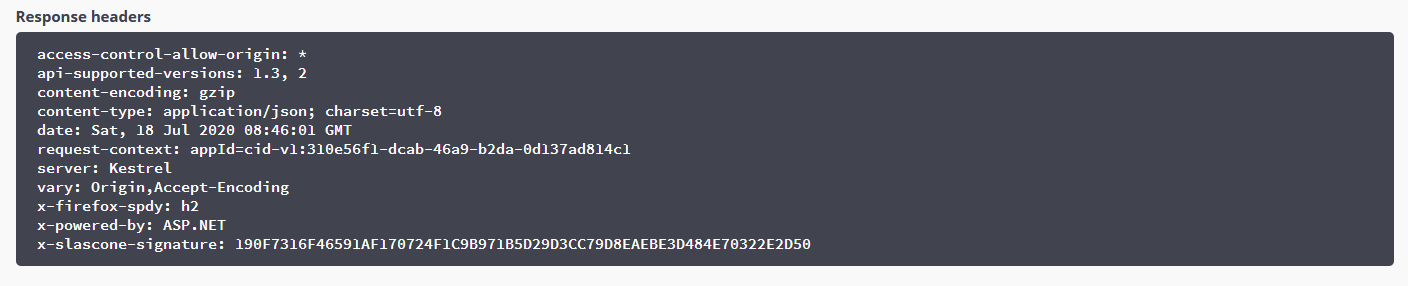
The response contains the header x-slascone-signature. This signature is generated from the content of the response body.
After receiving a response, the client should validate this signature to confirm that:
- the response came from SLASCONE
- the response body was not altered in transit
For implementation examples, see our GitHub code examples.
PUBLIC KEY
SLASCONE supports RSA-SHA256-based signature validation. In this mode, SLASCONE signs the response using a private key, while the client validates the signature using the corresponding public key.
The public key required for validation can be obtained from the Administration area of your SLASCONE environment.
Depending on your programming language or framework, the public key can be used either as a PEM file or as an XML string.
The public key can safely be distributed with the client application. The private key must remain protected, as it is used by SLASCONE to create valid signatures.
SIGNING KEY MANAGEMENT AND ROTATION
The signing key is part of the trust relationship between SLASCONE and the client application. The signing certificate is stored in Azure Key Vault.
Key Custody
By default, a signing certificate is generated in Azure Key Vault as part of the SLASCONE onboarding.
Alternatively, you can provide and manage your own signing certificate and import it into the Azure Key Vault used by SLASCONE. This allows you to retain control over the signing certificate and its lifecycle.
For example, the certificate can be issued by your own PKI or certificate authority instead of using a certificate generated specifically for SLASCONE.
Depending on the Azure Key Vault configuration, the private key can also be configured as non-exportable and HSM-backed (private deployment only).
Key Rotation
Azure Key Vault supports certificate versioning. When a signing key needs to be replaced, a new version of the signing certificate can be created or imported.
Key rotation should, however, be planned carefully. In many desktop, embedded, or permanently offline applications, the trusted public key is distributed as part of the application itself. In such cases, clients must first be updated to trust the new public key before SLASCONE starts signing data with the corresponding new private key.
This means that regular key rotation is not always operationally feasible. For example, older desktop application versions that are no longer updated may only know the original public key. Switching the signing key would cause those installations to reject newly signed responses or license files.
A typical key rotation process is:
- Generate or obtain the new signing certificate.
- Add the corresponding public key to the client application while continuing to trust the existing public key.
- Deploy the updated client application to all installations that must continue receiving newly signed data.
- Create or import the new certificate version in Azure Key Vault.
- Use the new certificate version for newly generated signatures.
- Continue trusting the previous public key for as long as previously signed data or older client versions must remain supported.
Previously signed data remains valid after a signing key has been rotated, provided that the client continues to trust the public key corresponding to the key that created the signature.
For products with long-lived desktop or offline installations, it can therefore be preferable to keep a signing key stable for a longer period and rotate it only when necessary, for example as part of a planned client upgrade or in response to a suspected key compromise.
Multiple Signing Keys
During a key rotation period, a client application can trust more than one public key. Signature validation can therefore be attempted using the trusted public keys until a matching key is found.
The signature itself does not include a key identifier or certificate chain that selects the corresponding public key. Management of trusted public keys is therefore handled by the client application.
This is particularly relevant for permanently offline scenarios using license files , where previously generated license files may need to remain valid after a signing key has been rotated.
REPLAY PROTECTION
In addition to the response body signature, SLASCONE provides an optional mechanism to protect against replay attacks. This mechanism uses a nonce-based challenge-response flow.
Replay protection helps ensure that an attacker cannot capture a valid API response and successfully reuse it later.
How It Works
The nonce mechanism works as follows:
- Client generates a nonce: Before making a request to the SLASCONE API, the client generates a unique random value, for example a GUID or cryptographically random bytes, and Base64-encodes it.
- Client sends the X-Nonce header: The client includes this Base64-encoded value in the request header named X-Nonce.
- Server signs the nonce: Upon receiving the request, the SLASCONE API extracts the nonce from the X-Nonce header, decodes it, and calculates a signature over the raw nonce bytes using the same signing mechanism that is used for the response body signature.
- Server returns X-Nonce-Signature: The calculated signature is returned in the response header X-Nonce-Signature.
- Client validates the signed nonce: The client verifies the X-Nonce-Signature against the nonce that was originally sent.
If the validation succeeds, the client can confirm that:
- the response came from the authentic SLASCONE server
- the response corresponds to the current request and was not replayed from an earlier interaction
Why It Protects Against Replay Attacks
A replay attack occurs when an attacker intercepts a valid API response and attempts to reuse it at a later time.
Without nonce protection, an attacker could potentially capture a valid response and try to replay it later, for example after a license has expired or been revoked.
With the X-Nonce mechanism:
- each request contains a unique, unpredictable nonce
- the server must sign this specific nonce to produce a valid X-Nonce-Signature
- captured responses cannot be reused for future requests with different nonces
- the client can detect whether the returned nonce signature belongs to the request it just sent
Implementation Example
Request:
GET /api/v2/isv/{isv_id}/provisioning/heartbeats
X-Nonce: rGxvYmFsLW5vbmNlLXZhbHVl
Response:
HTTP/1.1 200 OK
x-slascone-signature: <Base64-encoded signature of response body>
X-Nonce-Signature: <Base64-encoded signature of the decoded nonce bytes>
{ ... response body ... }
Signature Validation Modes
The nonce signature uses the same validation mode as the response body signature:
| Mode | Algorithm | Key Type |
| 1 | HMAC-SHA256 | Symmetric Key |
| 2 | RSA-SHA256 with PKCS#1 padding | Asymmetric (Public/Private Key Pair) |
Best Practices
-
Always use unique nonces: Generate a new random value for each request, for example
Guid.NewGuid().ToByteArray(). - Store nonces temporarily: Keep the nonce in memory only for the duration of the request-response cycle.
- Clean up old nonces: Remove stored nonces after validation or after a reasonable timeout.
- Combine with body signature validation: For maximum security, validate both the x-slascone-signature header and the X-Nonce-Signature header.
SECURING YOUR SECRETS
Make sure to securely manage your secrets as described here.
Comments
0 comments
Please sign in to leave a comment.