
Creating an edition is the next step after defining a product. While the product defines the reusable licensing structure, the edition defines how that structure is offered and used in practice.
Editions are the basis for license creation. Every license in SLASCONE is created from an edition. Therefore, even if you do not offer editions commercially, you still need at least one edition in SLASCONE.
WHERE EDITIONS FIT
Editions sit between products and licenses. A product defines the reusable licensing structure, while an edition defines a specific package or configuration based on that structure.
Licenses are then created from editions. This means that the edition determines which features, limitations, variables, expiration settings, and other properties are available or preconfigured during license creation.
Editions can represent commercial packages, trial versions, special customer configurations, or internal templates for license creation.
CORE EDITION PROPERTIES
When creating an edition, you must first define the provisioning mode and the client type. These are the most fundamental properties of the edition and cannot be changed later.
These settings have a major impact on how the underlying licenses behave. For example, a floating device license follows a fundamentally different licensing logic than a named user license.
-
Provisioning Mode
Named
Floating
-
Client Type
Devices
Users
CHOOSING THE PROVISIONING MODE AND CLIENT TYPE
SLASCONE combines two provisioning modes, Named and Floating, with two client types, Devices and Users. The correct combination depends on the licensed unit that SLASCONE technically identifies, activates, and validates.
| Typical scenario | What SLASCONE identifies and licenses | Provisioning mode | Client type | Typical implementation |
|---|---|---|---|---|
| Desktop or locally installed application licensed per installation | A specific computer or software installation | Named | Devices | Use a stable hardware ID, machine ID, or persistent installation ID as the client_id. |
| Pool of concurrently active installations or devices | Individual devices or installations from a larger population | Floating | Devices | Each active device or installation uses its own client_id. SLASCONE enforces the permitted concurrency. |
| Application where specific individual users are licensed through SLASCONE | Individual users explicitly identified and assigned in SLASCONE | Named | Users | Use a stable user identifier from the identity provider. A user login alone does not require the Users client type. |
| Pool of concurrently active users | Individual users limited by the permitted number of concurrent users | Floating | Users | Each user must be individually identified in SLASCONE, typically using a stable user ID from the identity provider. |
| B2B on-premises or SaaS application where users are managed internally by the application | A server, SaaS tenant, customer environment, or application instance | Named | Devices | Use a stable tenant_id, environment_id, or instance ID. This remains the recommended model even when the customer is commercially charged per user. |
| B2B application licensed according to concurrently active users | Individual users or user sessions identified through SLASCONE | Floating | Users | Use this model only when SLASCONE receives and manages the identity of each active user. If only the tenant or server is identified, use Devices instead. |
| IoT solution licensed per physical device | A specific IoT device | Named | Devices | Use a stable serial number, hardware ID, or manufacturer-assigned device ID as the client_id. |
A common mistake occurs in B2B SaaS applications that are commercially priced (among others) according to the number of users. If the application itself manages the users, roles, and permissions, while SLASCONE validates only the complete tenant, the recommended client type is normally Devices, not Users. The licensed user count is then represented as a SLASCONE limitation.
The key decision question is: What does SLASCONE technically identify and validate? If the answer is a device, installation, server, tenant, environment, or instance, choose Devices. Choose Users only when SLASCONE must identify, assign, activate, or monitor the individual users themselves.
ACTIVATION UPON CREATION
By default, a new license is not activated immediately. It is activated when the client sends an activation event.
However, there are scenarios where requiring the client to send an activation event is either not possible or would add unnecessary complexity. For these cases, new licenses can be activated automatically during license creation.
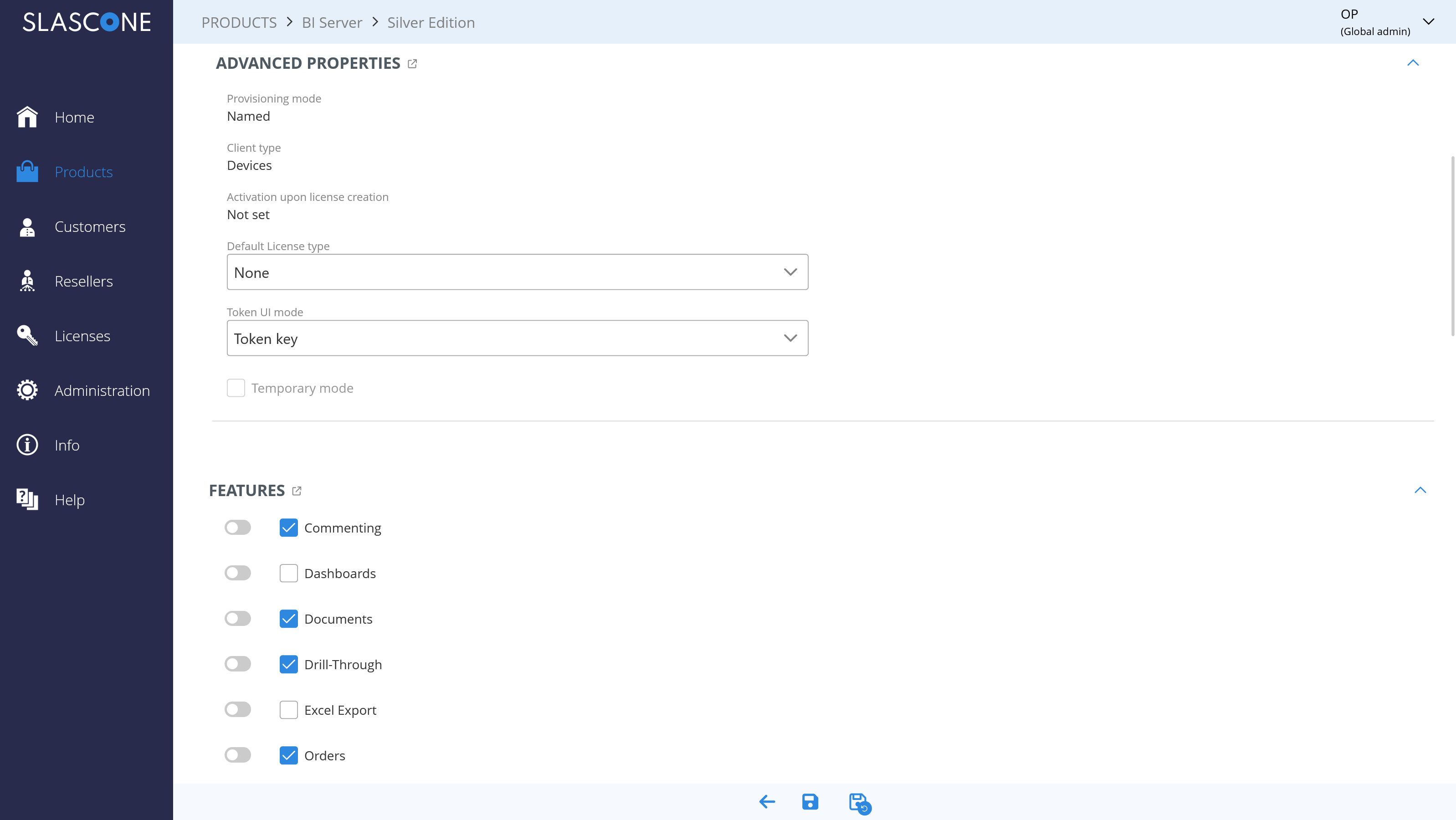
This setting is configured at the edition level. Therefore, it applies to all licenses created from that edition.
Activation upon creation is especially useful when the activated client is already known at license creation time, for example in tenant-based SaaS licensing, server or instance licensing, token-key scenarios, or migration from a legacy licensing system.
HOW ACTIVATION UPON CREATION WORKS
When activation upon creation is enabled, SLASCONE creates the license and the corresponding activation record as part of the same license creation process.
In these scenarios, creating the license can be sufficient. A separate activation call from the client or backend is not required, because the activation already exists after license creation.
The selected option determines which value is used as the activation identifier, or which value is used to prepare a later activation.
ACTIVATION UPON CREATION OPTIONS
| Option | Meaning | Typical use case | Initial License Creation |
|---|---|---|---|
| License ID | The SLASCONE license_id is automatically used as the activation identifier. |
SaaS instances with a GUID identifier. | API |
| Token key | Uses the token key as the activation identifier. | Obsolete. | API/UI |
| Customer number | The underlying customer number is automatically used as the activation identifier. | Customer-level activation, only if the customer number uniquely identifies the licensed client, tenant, or instance. | API/UI |
| Customer email | The underlying customer email is automatically used as the activation identifier. | B2C scenarios. | API/UI |
| Preactivation - Legacy key | A legacy_key is required during license creation. |
Migration from an existing or legacy licensing system. | API/UI |
| Preactivation - Client ID | An explicit client_id is required during license creation. |
Hardware/IoT scenarios where the issued license is bound to a specific device (e.g., serial number). | API/UI |
CHOOSING THE RIGHT ACTIVATION OPTION
The activation identifier should be stable and unique for the licensed unit. In most technical integrations, this identifier is the value that SLASCONE later treats as the client_id.
The activated client is relevant for subsequent SLASCONE operations such as heartbeats, analytics, session management, and entitlement checks. Therefore, the activation option should be chosen carefully before the edition is used in production.
ADJUSTABLE PROPERTIES
Editions provide a high degree of flexibility during license creation. This is based on the concept of adjustable properties.
For each relevant property, such as a feature, limitation, or variable, you can decide whether the license creator may change the value during license creation.
Adjustable: When creating a new license, the value is pre-populated from the edition, but the license creator is allowed to change it.
Not Adjustable: When creating a new license, the value is fixed by the edition and cannot be changed by the license creator.
The relationship between editions and licenses is persistent. Changes in an edition immediately affect the licenses based on that edition.
All properties are Not Adjustable: The edition is very restrictive. License creators can create a license, but cannot modify any of the predefined values.
All properties are Adjustable: The edition mainly serves as an initialization template. License creators can change all relevant values.
A mixture of Adjustable and Not Adjustable properties: This provides the most flexibility. License creators can change only those values that the edition explicitly allows.
IMPLICATIONS
New Feature: If a new version of your product introduces a new feature, you can control how existing licenses should behave. Typically, you would set the feature as not adjustable in the edition and define its value according to your product strategy. The feature may be enabled in one edition and disabled in another.
Premium to Standard Feature: A feature that was once a premium differentiator may later become standard. Instead of updating all licenses individually, you can enable the feature in the relevant edition and define it as not adjustable.
REQUIRED VARIABLES
A variable can be marked as required. In that case, a value must be provided when creating a license. Otherwise, the license cannot be saved.
VISIBILITY SETTINGS
You can define whether features, limitations, variables, and constrained variables are visible in the Vendor/Reseller Portal and in the Customer Portal.
If a setting is adjustable, it can only be hidden in the Customer Portal.
You can also define whether the expiration date is shown when creating a license:
Comments
0 comments
Please sign in to leave a comment.